Free driver for the Canon LB2900B printer line
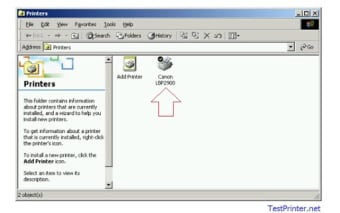
The Canon LBP2900 Driver is a free utility officially developed and distributed by Canon Inc for its line of desktop printers. With this driver package, users can flawlessly use and optimize their products from the Canon LBP2900B series of laser printer products. It sets up your device to recognize and communicate with your printer.
Top Recommended Alternative
Needless to say, this is a necessary software that comes with having a printer, similar to other brands’ HP LaserJet P1006 Printer Driver or Epson L210 Drivers. As printers are not plug-and-play devices, you’ll need printer drivers to prepare your device for these new pieces of equipment.
Unlock your printer’s potential
Usually, the driver installer package comes together with the purchase of a printer. However, should you lose the physical installer, or if you’re not the original owner, you can easily access this Canon LBP2900 driver–thanks to its small file size and easy installation process. It’s only 7.2MB and the installer will do the rest. Usually, a restart is required to prepare your system for the new, printer-ready setup.
An additional strength of this driver package is that it is compatible with most operating systems and its drivers work with both 32-bit and 64-bit system architectures. This means that users need only run the installer and relax, as the driver doesn’t require them to choose settings for their specific system. This makes it accessible even for people without advanced technical knowledge, making setting up printers easy for everyone.
Once installed, you can go ahead and plug your Canon LBP2900 laser printer and take it for a spin. There’s no need to run other third-party applications or to tinker with anything with the actual printer. You can open up a document and directly print it, your device is now automatically connected and set up together with the printer. Whether it’s a word processor, a graphics editor, or a PDF viewer, you can just access the print command and wait for your physical printout to appear.
Not for all applications
Of course, it’s necessary to point out that the Canon LBP2900 driver only works for the Canon LBP2900 product line of laser printers. It is not a one-stop-shop for all printers, not even for all Canon printers. For example, if you have the newer PIXMA or MAXIFY inkjet printers, you will have to search for the particular driver sets for these products. If you try to use a different printer with this driver, it will remain unrecognizable to your system and you will end up having problems.
Also, as a driver, it is limited to establishing the proper protocols between your system and the Canon laser printer supported by the package. It has no capabilities to troubleshoot or even assist you should you encounter problems with your printer. In case of printing errors, paper jams, or even cartridge problems, you’ll have to consult with the user’s manual or worse, call technical support.
Latest driver versions and official downloads
While the Canon LBP2900B driver remains essential for proper operation, the most recent official Canon driver release for this model is the CAPT Printer Driver R1.50 Ver.3.30, which supports 32-bit and 64-bit Windows systems up to Windows 10 and 8.1. Canon’s support site shows this version as the current release from 2017, and it’s still the recommended driver for LBP2900/2900B installations on those operating systems. There’s also a Linux CAPT driver (v2.71) available for users who operate their printers on Linux environments using CUPS systems.
Windows 11 compatibility challenges
Although Canon officially lists drivers up through Windows 10, users attempting to install the LBP2900B driver on Windows 11 sometimes encounter compatibility issues. Microsoft support threads reveal that Canon hasn’t released a dedicated Windows 11 driver for this model, meaning the official installer may not work, and system installers may fail to detect the printer—especially on newer PCs. Users report needing to connect the printer after starting the driver installation or using compatibility mode workarounds when installing older drivers.
Troubleshooting tips from community reports
Real-world user feedback highlights a few practical fixes when setting up the LBP2900B on newer systems. For example, users suggest checking the USB connection (direct port instead of hubs), reinstalling drivers after removing old versions from “Devices and Printers,” and even disabling security software temporarily while installing. If your system sees the printer as an unknown device or fails to install, manually selecting the driver folder via Device Manager may help when automatic setup isn’t working.
Third-party tools for driver updates
For those who prefer not to manually track down drivers, there are automated solutions that can help keep your printer drivers up to date. Services like Driver Easy and other driver updater tools can scan your system, detect outdated or missing Canon LBP2900B drivers, and install the correct version for your OS. This can save time and reduce the risk of choosing the wrong driver file, though users should always ensure they download such tools from reputable sources and verify the drivers they install.
A necessity for Canon printers
For users of any Canon printer under the LBP2900 line, the Canon LBP2900 Driver is a necessary software to have. It ensures that your printer has the proper protocols to communicate with your system, letting you use it with ease and enjoy its full potential. Of course, it’s important to note that it only serves a single product line and that it is not a troubleshooting tool.